

Uploading a referral fax does not fill structured EMR fields. Staff or software must extract the details, confirm the patient with at least two identifiers, and save only reviewed and approved values.
The process has three steps:
- Classify and extract: Log receipt, identify the document, and map patient, provider, and referral details to EMR fields.
- Match and resolve: Verify the patient, referring provider, and destination. Hold unclear values for review, while sending urgent concerns to clinical staff.
- Review, save, and track: Save approved fields, link the original fax, and track scheduling, follow-up, and closure.
Keep source text separate from extracted, validated, and saved values. Each correction needs a record of who made it and why. Measure results through processing time, staff handling time, correction rates, and unresolved referrals - not upload counts alone.
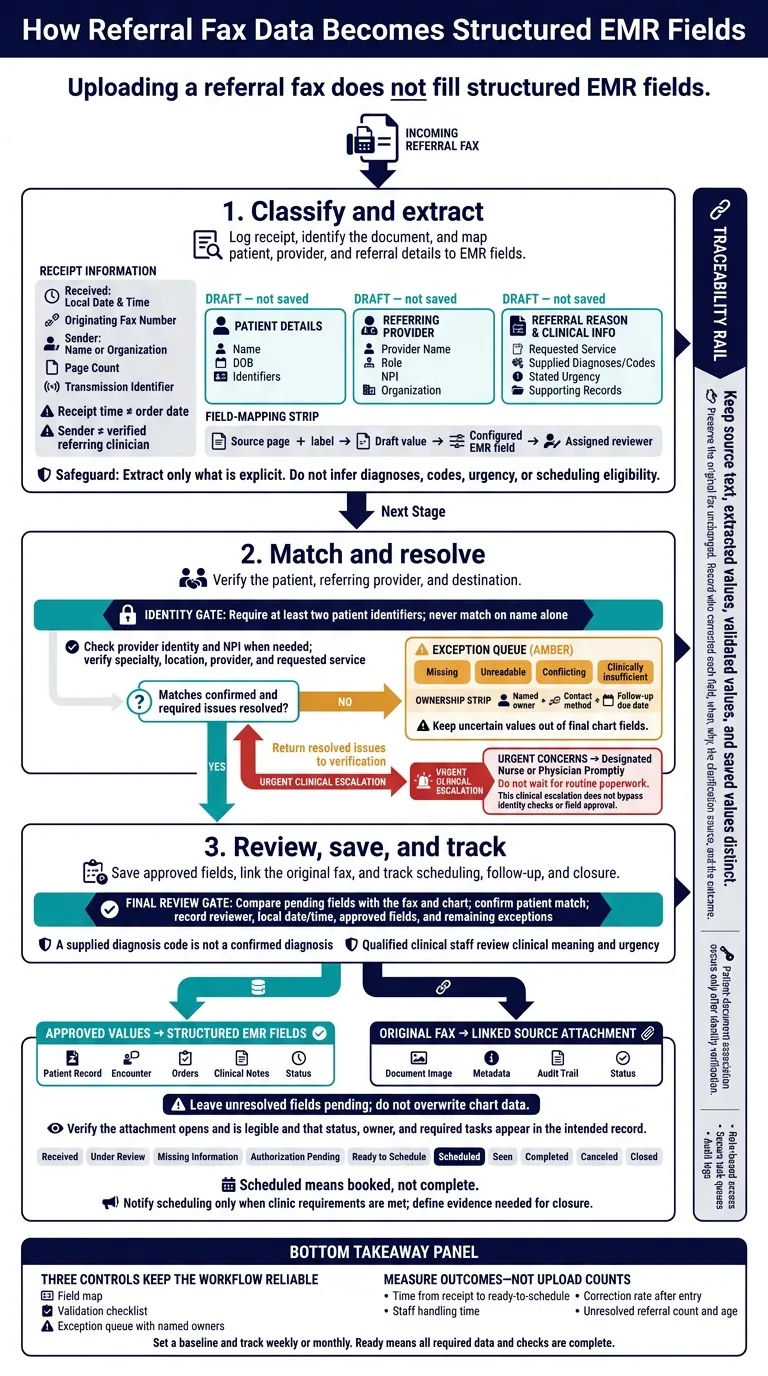
How Referral Fax Data Becomes Structured EMR Fields
Step 1: Classify the Fax and Extract Referral Data
Identify Referrals and Log Receipt Details
Read the cover sheet, page headers, and clinical content together. Before classifying the fax as a referral, check its page order, attachments, and document type. Send missing pages, mixed-patient documents, or unclear document types to intake review.
Keep the classification and extracted field values in draft form for review. Once the fax is classified, extract only fields visible in the source document.
Record the received date and time in the clinic’s local time zone, the originating fax number, the sender’s name or organization as displayed, and the page count. Also record the transmission identifier, if available, the document type, and the staff member or system that received it. Keep receipt time separate from the order date. Sender details help with routing; they do not prove the referring clinician’s identity.
Manual sorting depends on staff judgment. AI classification applies the same rules and confidence thresholds to every fax. Set separate review thresholds for document classification and each extracted field.
For example, Diagna’s FAXFlo receives, reads, categorizes, and routes incoming faxes before extracted values are reviewed.
Map Patient and Referring Provider Details
Use one field map to trace each extracted value to its source. Store the page number and nearby label - not just the filename. Set requirements under clinic policy and assign a reviewer to each field group.
| Draft field | Source location | EMR destination | Requirement | Validation rule | Reviewer |
|---|---|---|---|---|---|
| Patient legal name, prior name, DOB, supplied MRN | Referral or demographics page | Patient match; demographics | Name and DOB usually required; MRN if supplied | Use MM/DD/YYYY; compare at least two identifiers | Registration |
| Address and phone | Demographics/contact block | Patient contact fields | Required or optional under clinic rules | Flag differences from existing records | Registration |
| Carrier, member ID, group number | Insurance card or referral form | Coverage/referral fields | Required for payer-dependent services | Check transcription; send for eligibility verification | Benefits staff |
| Referring provider name and credentials | Referral/signature block | Referring-provider field | Required when applicable | Preserve credentials; confirm identity | Intake staff |
| Organization and location | Letterhead/provider block | Provider organization/location | Required when needed to distinguish provider locations | Compare with trusted practice records | Intake staff |
| NPI | Order/provider identifier block | Provider identifier | Required by clinic or payer rules | Check format and identity match; never infer | Intake staff |
| Provider phone and fax | Contact block | Provider contact fields | Required when needed for follow-up | Compare with trusted practice data | Intake staff |
| Referring, ordering, rendering roles | Order/signature/service sections | Separate provider-role fields | Required when relevant | Referrer directs; orderer authorizes; renderer performs | Intake staff |
Map Referral Reasons, Services, and Status
Once identity and referral details are mapped, record the fields used for routing and follow-up.
Keep the source wording alongside any normalized value. Record only what is explicit. Do not infer diagnoses, codes, urgency, or scheduling eligibility. Use local referral mappings for EMR fields and status.
| Draft field | Source location | EMR destination | Requirement | Validation rule | Reviewer |
|---|---|---|---|---|---|
| Referral reason | Reason field/clinical note | Referral reason | Usually required | Retain wording; flag unclear meaning | Intake/clinical reviewer |
| Requested service or specialty | Request/order section | Requested service | Usually required | Map only an explicit request | Intake staff |
| Supplied diagnoses and codes | Diagnosis/order section | Referral diagnosis fields | Required by clinic or payer rules | Preserve supplied values; flag conflicts | Clinical/coding reviewer |
| Symptoms and duration | Clinical narrative | Referral clinical details | Optional if absent | Extract only stated symptoms and timeframe | Clinical reviewer |
| Stated urgency | Priority field/narrative | Draft referral priority | Review if absent or unclear | Record explicit wording; route for policy-based review | Clinical reviewer |
| Supporting records | Attachments and enclosure list | Referral attachments | Service-dependent | Check listed records against received pages | Intake staff |
| Source and destination | Sender/request blocks | Referral source; destination clinic | Usually required | Separate sender from referrer; verify requested location | Intake staff |
| Receipt date | Transmission log | Referral received timestamp | Required | Use local date/time; do not substitute order date | Intake staff/system |
| Intake status | Intake processing record | Referral workflow status | Required | Mark received or awaiting review - not approved | Intake staff/system |
| Missing-information flag | Completeness checks | Exception/task fields | Required when incomplete | Name the missing or conflicting item | Assigned intake owner |
| Scheduling eligibility | Clinic prerequisites | Scheduling readiness | Required before scheduling | Leave undetermined until required checks pass | Scheduling/benefits staff |
Step 2: Match Records and Address Missing Information
Confirm Patient, Provider, and Destination Matches
Match the fax to the EMR using patient, provider, and destination data. Before entering any field into the chart, verify that it belongs to the right record. Require at least two patient identifiers; never match on name alone. ONC lists name, birth date, phone number, and address as core matching fields.[4]
If you can’t confirm a match, search prior names and check for duplicate or recently created charts. Follow the clinic’s new-patient registration procedure rather than creating an unverified chart from the fax alone. Log the search terms, matches reviewed, reviewer, timestamp, and final decision.
Check the extracted referring clinician against the clinic directory and, when needed, the CMS NPI Registry. Confirm that the NPI matches the named clinician and specialty - not just the practice or billing entity.[5] Also verify the receiving specialty, location, provider, and requested service. If any match remains uncertain, hold the referral and send the issue for review.
Flag Missing, Unreadable, or Conflicting Information
Flag referral data that’s missing, unreadable, conflicting, or insufficient for clinical review. Keep uncertain values out of final chart fields and keep incomplete referrals in exception handling. Give each issue type its own hold path.
| Issue type | What to flag | Review route | Clinic-defined block |
|---|---|---|---|
| Missing | Required callback number, referral reason, supporting report, or authorization is absent | Referral coordinator; benefits staff for coverage requirements | Hold scheduling or triage when the missing item is required |
| Unreadable | DOB, NPI, or order text cannot be read | Intake staff checks the image and requests a clearer copy | Hold affected field entry; prevent linking if identity is uncertain |
| Conflicting | Patient identifiers disagree, or provider name and NPI do not match | Registration lead or referral coordinator | Hold chart linking, chart creation, or provider selection |
| Clinically insufficient | Referral is readable but incomplete for specialty review | Clinical reviewer or referring clinician | Hold routine triage or scheduling until minimum requirements are met |
An administrative hold must not bury a potentially urgent referral. Send urgent clinical findings promptly to the designated nurse or physician while staff pursue missing information. Route each flagged issue to a named reviewer - not back into the chart.
Assign Follow-Up and Keep the Original Fax
Give every issue an owner, next action, contact method, and follow-up due date. Log the referral ID, affected field, exact value received, contact attempts, and resolution.
For corrections, record the author, timestamp, clarification source, corrected value, and outcome. Keep the original fax unchanged and store clarifications separately. Associate documents with the patient only after verifying identity so the record remains traceable before chart entry.
Once all matches and exceptions are resolved, move the referral to chart review and save.
Step 3: Review and Save Data to the EMR
Check Referral Data Before Chart Entry
Once matches and exceptions are cleared, complete a final review before writing data back to the EMR. Use a clinic-approved pre-save checklist to confirm the patient match, then check only the pending fields against the fax and chart. Keep referring-provider instructions as written - don’t interpret them. A supplied diagnosis code is not a confirmed diagnosis. Qualified clinical staff must review clinical meaning and urgency.
Set confidence thresholds for fields that can be accepted automatically. Fax receipt date and document type may qualify, but clinical fields, authorization details, and unclear text need staff approval. Record the reviewer’s user ID, local date and time, approved fields, and any remaining exceptions. Save only approved values. Leave unresolved fields explicitly pending rather than overwriting chart data.
Save Verified Fields and Attach the Source Fax
After approval, save verified values to their configured EMR fields and attach the source fax. Attaching a fax does not populate structured fields. Link the original fax to the referral record, then check that it opens and is legible. Confirm that the referral status, owner, and required authorization tasks or scheduling entries appear in the intended record. A successful upload alone isn’t enough.
Diagna integrates with existing EMRs. Verify field destinations, write-back behavior, permissions, review gates, duplicate checks, transfer-error handling, and correction steps. Before using the workflow in production, test failed transfers and confirm whether each action creates a referral, updates an existing one, or only attaches a document.
Route Referrals and Track Status Changes
After saving chart data, use defined statuses such as Received, Under Review, Missing Information, Authorization Pending, Ready to Schedule, Scheduled, Seen, Completed, Canceled, and Closed. Notify scheduling only when clinic requirements are met. Scheduled means booked, not complete.
Link appointment, cancellation, no-show, consultation, and completion events to the referral, and define the evidence needed for closure. Keep unresolved cases with the assigned owner. Escalate urgent concerns under clinical protocols without waiting for routine paperwork. Use role-based access, secure task queues, and audit logs to protect and track changes to ePHI.
Conclusion: Keep Referral Data Verified and Traceable
After fax intake, matching, and chart entry, use three controls: a field map, a validation checklist, and an exception queue with named owners. They keep EMR fields verified, mapped, and available for review. The audit trail should show who reviewed, corrected, and approved each field.
Once the workflow is running, set a baseline and track four measures weekly or monthly: time from receipt to ready-to-schedule, staff handling time, correction rate after entry, and unresolved referral count and age. Count a referral as ready only after all required data and checks are complete. Automation adds value only when accuracy and traceability hold - and corrections and unresolved referrals stay low.
FAQs
How should we handle duplicate referral faxes?
Before attaching anything to the EMR, compare the extracted patient identifiers, document type, referring organization/provider, service and receipt dates, and referral details.
For suspected duplicates, route the later fax to the staff review/exception queue. Show it alongside the original document and extracted fields for side-by-side review instead of creating a new chart item.
If the fax includes updated or changed information, attach it to the existing referral and flag what changed. [1][2]
What if referral data conflicts with existing chart data?
The system flags the discrepancy and sends the document to a staff review queue, where the original appears alongside the extracted data [1][2][3]. Automated systems should never overwrite existing records or decide which conflicting information is correct [3]. Under clinic verification policies, staff have final authority to review, reconcile, or update the patient record before any data is finalized in the EMR [1][2][3].
How can we test automated field mapping safely?
Start in a nonproduction EMR with synthetic or de-identified records. If you use production patients, label them clearly and monitor them closely.
Test each step from receipt through filing, including matching, routing, task creation, and audit logging. Compare the results with the expected outcomes in a test matrix. Cover cases with similar names, duplicate files, unreadable scans, and incomplete referrals.
Before starting a live pilot, get written sign-off from staff and clinical reviewers. Define when the pilot must stop if safety checks fail.
Referral management
Diagna finds referrals in your faxes, flags anything missing, and keeps each one moving until the patient is booked.
See how Diagna manages referrals