

Real-time data helps reduce referral leakage by showing which referrals need action - and who should act next. Give every referral an owner, status, next step, and due date. Review overdue work daily, with outreach targeted within one business day unless clinical urgency requires sooner.
An unscheduled referral is not proof of lost revenue. Track unresolved referrals, confirmed care elsewhere, completed visits, and collected payments separately. Measure contact and scheduling times, then follow each referral through the visit and receipt of the consultation report.
Tools such as Diagna can support intake and tracking through scheduling, but visit completion needs a separate workflow. Start with one referral workflow, collect at least 30 days of baseline data, and verify patient-data safeguards before rollout. Judge results by local staff time, completed visits, and collections - not vendor claims alone.
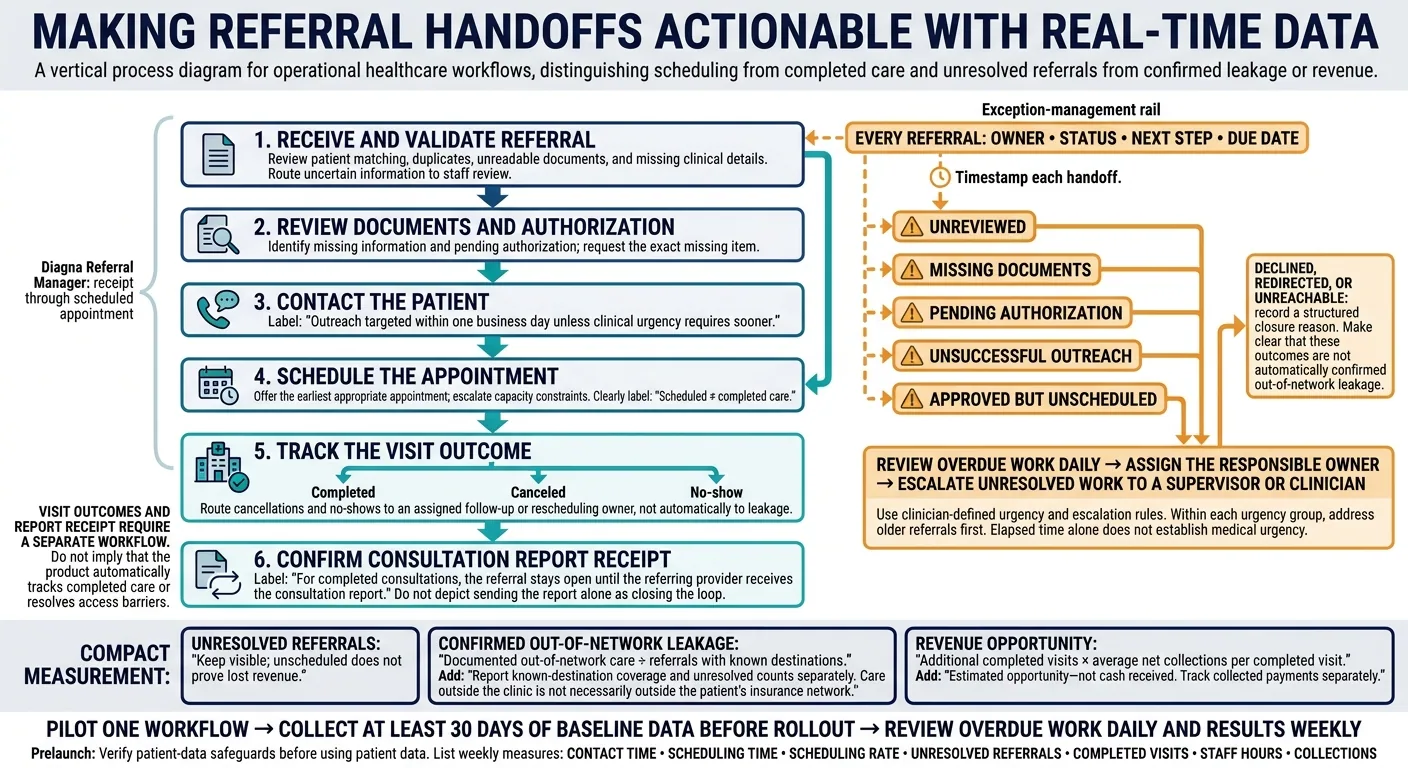
How Real-Time Referral Tracking Closes the Loop
How Real-Time Monitoring Helps Staff Act Sooner
Live monitoring keeps unresolved referrals visible until they’re scheduled, completed, or closed. Check how often EMR and scheduling data sync, which system serves as the source of truth for each field, and who fixes failed syncs or delayed entries.[4] This view turns a referral backlog into work staff can act on.
Track Status, Ownership, and Next Steps
Timestamp each handoff, not just receipt and scheduling, while a referral remains unresolved. This separates time spent on document review, authorization, outreach, and waiting for an available appointment. Staff can then see where work slows down without assuming intake is the problem.[2][3]
Alert Staff to Overdue Referrals
Create exception queues for unreviewed referrals, missing documents, pending authorization, unsuccessful outreach, and approved referrals that aren’t yet scheduled. Assign overdue items to the person responsible, and escalate unresolved work to a supervisor or clinician. Use deadline-based alerts for overdue items; leave unchanged pending work in the queue.
Set response deadlines based on specialty, payer requirements, and clinician-defined urgency. Within each urgency group, address older referrals first. Elapsed time alone does not establish medical urgency. Administrative staff should follow clinician-defined escalation rules, and clinicians should review exceptions.
Follow Referrals Through Visit Completion
Record cancellations, no-shows, rescheduling actions, and completed visits. Assign an owner to any follow-up that remains.
Track whether the referring provider received the consultation report, not just whether staff sent it. AHRQ describes closing the referral loop as ensuring that the referring provider receives a report from the provider to whom the patient was referred.[1] For completed consultations, the referral stays open until the consult report is received.
Metrics That Link Referral Delays to Revenue Risk
Once referrals have owners and overdue alerts, these metrics show where delays are building - and how much revenue may be at risk.
Measure Contact Times, Scheduling, and Backlogs
Group referrals into fixed cohorts by arrival date, and use the same follow-up window for each cohort. Show the cohort size beside every percentage. Define eligibility once, keep unresolved referrals in the denominator, and make them visible in reports. Break down results by referral source, location, specialty, and payer. First-contact time is available immediately; completed-visit and no-show rates need enough follow-up time to mature.[5][7]
Use these metrics to track referral backlogs in real time and prompt daily staff action, not just monthly reviews.
| Metric | Risk identified | Staff action |
|---|---|---|
| Referral-to-first-contact time: median and 90th-percentile hours | Patient disengagement or referral sent elsewhere | Assign an owner and contact the patient within the clinic’s service-level target |
| Referral-to-scheduling time: calendar days | Access delay and possible care elsewhere | Offer the earliest appropriate appointment, escalate capacity constraints, or contact the referring office |
| Scheduling rate: scheduled ÷ eligible referrals received | Referrals stalling before booking | Review why referrals remain unscheduled |
| Missing-information rate: referrals missing required clinical, demographic, insurance, or authorization data ÷ received referrals | Referrals stalled before scheduling | Request the exact missing item and track which referring sources show this pattern |
| Overdue open referrals: count past the clinic’s defined service-level window | Growing unresolved backlog | Review the queue daily and give every referral a next step |
| Closed referrals with no appointment | Unscheduled referrals disappearing from view | Require a structured closure reason and attempt an appropriate final outreach |
| Cancellations and no-shows: each ÷ scheduled referral appointments | Bookings not becoming care | Use reminders, fill openings from the waitlist, and rebook promptly |
| Completed-visit rate: completed ÷ eligible referrals received | Low conversion from referral to care | Compare scheduled, completed, canceled, and no-show outcomes by cohort |
Tie cancellation and no-show measures to a defined appointment period. Report unresolved referrals alongside completed outcomes, and suppress percentages for cohorts under 10 referrals.[5][7] Review counts as well as rates.
Use these same cohorts to separate slow processing from actual referral loss.
Distinguish Leakage From Collected Revenue
Calculate confirmed out-of-network leakage = documented out-of-network care ÷ referrals with known destinations. Report known-destination coverage and unresolved counts separately. Identify the destination data source and its reporting lag. Keep care outside the clinic separate from care outside the patient’s insurance network.[5][6]
Estimate revenue opportunity = additional completed visits × average net collections per completed visit. Base the estimate on historical collections for the relevant service line and payer mix. State the measurement period and assumptions. This is an estimate of opportunity - not cash already received.
Compare similar cohorts before and after monitoring changes. Account for referral volume, staffing, appointment capacity, seasonality, and payer mix. Unless a stronger evaluation establishes causation, describe additional completed visits as associated with monitoring, not caused entirely by it. Track collections separately as payments arrive.
Using Diagna for Referral Intake and Tracking
Diagna’s intake and tracking tools can help teams spot referrals sooner and reduce delays. They can’t remove patient choice, payer limits, or capacity constraints. The value is earlier visibility - not automatic resolution.
Process Incoming Faxes With FAXFlo
FAXFlo receives, reads, categorizes, and routes incoming faxes. Diagna also provides one inbox for fax, email, and uploads, along with patient data extraction and EMR linking.
Before turning on auto-filing, test patient matching and routing with the clinic’s own documents. Send uncertain matches, duplicates, unreadable pages, and missing clinical details to staff review. Keep those exceptions with staff until the data is clean.
Track Referrals From Receipt to Scheduling
Once intake data is clean, the referral queue becomes the hub for follow-up. Diagna Referral Manager tracks inbound referrals from receipt through a scheduled appointment. During setup, confirm how updates reach the queue, who owns each next step, and how staff will spot overdue work. Tracking ends at scheduling; cancellations and completed visits need a separate workflow.
Diagna says it can integrate with existing EMRs, including older systems without an API. Its staged approach begins with a staff-triggered “Sync to EMR” action. Verify supported versions, read/write fields, patient matching, and approval controls.
Diagna also describes its data handling as HIPAA-compliant. Before processing patient data, validate its business associate agreement, encryption, permissions, audit logs, retention rules, and downtime procedures.
Verify Diagna's Vendor-Reported Time Savings
Diagna reports 4+ staff hours saved per day, 20+ hours per week, and 98%+ document-processing accuracy. These are vendor-reported results - not guaranteed referral outcomes. Ask what “accuracy” measures and which documents were tested.
Establish at least a 30-day baseline. After rollout, measure local document-handling time and audit processing errors. Track intake efficiency and labor savings separately from scheduling and completed-visit results.
Conclusion: Put Referral Tracking Into Practice
Real-time monitoring flags stalled referrals while staff still have time to act and reduce revenue risk. Track confirmed leakage, unresolved referrals, and collected revenue separately.
Start with one workflow. Expand only when the process is stable.
Start With 1 Referral Workflow
Pilot one specialty or high-volume referral source. Before launch, define statuses, owners, deadlines, escalation rules, and closure reasons. Set outreach deadlines based on clinical urgency, and distinguish completed care from declined, redirected, or unreachable cases.
Before using patient data, confirm role-based access, audit logs, HIPAA Security Rule controls, and a signed business associate agreement.[8][9][10]
Once the workflow is live, review it daily to keep referrals moving.
Review Overdue Work Daily and Results Weekly
Check overdue work each morning. Assign a next action for missing information, delayed authorizations, and unsuccessful outreach. Escalate urgent referrals to clinical staff.
Each week, compare results against the pre-rollout baseline: contact time, scheduling time, scheduling rate, unresolved referrals, completed visits, staff hours, and collections.
FAQs
How can we prevent referral alert fatigue?
Replace manual oversight with automated, exception-based management. A central, real-time dashboard tracks referral progress and alerts staff only when something needs attention - for example, when a specialist hasn’t confirmed receipt within 48 hours or a patient misses a five-day scheduling window.
Staff can then focus on high-priority issues rather than routine follow-ups, reducing burnout and helping keep referrals from slipping through the cracks.
How can we track referrals when patients go elsewhere?
Real-time referral monitoring gives clinics a continuous digital record to track referrals when patients go elsewhere or put off scheduling. Diagna’s Referral Manager keeps that tracking in one place, from receipt to a scheduled appointment.
Automated tools flag delays and prompt outreach by text, email, or voice AI. Staff alerts help clinics follow up on stalled referrals, address bottlenecks, and reduce the risk of overlooking patients.
How do we measure ROI from referral monitoring?
Start with a 90-day baseline: measure monthly referral volume, staff coordination time per referral, referral turnaround time, and lost referrals. After automation, compare the results with those starting figures.
Calculate annual net return by adding recovered labor costs and revenue from previously lost referrals, then subtracting the platform’s annual operating cost.
Also track referral completion rates, follow-up consistency, and any reductions in overtime or temporary staffing costs.
Referral management
Diagna finds referrals in your faxes, flags anything missing, and keeps each one moving until the patient is booked.
See how Diagna manages referrals