

AI can reduce clinic paperwork by sorting faxes, preparing referral details, and tracking follow-ups - while staff keep control. Start with one low-risk task, collect 2 to 4 weeks of baseline data, and measure time saved alongside errors and rework.
In the AMA’s 2024 survey, 57% of physicians named reducing administrative burdens through automation as AI’s top opportunity. For clinics, that means choosing where automation fits:
- Use rules for fixed tasks and AI for reading documents or coordinating follow-ups.
- Keep staff review in place for patient matches, clinical urgency, coding, and submissions.
- Check EMR connections and HIPAA safeguards before handling patient data.
- Test costs and results, including review time, training, and software fees.
This guide covers those steps across intake, scheduling, messages, authorizations, and billing. It also examines Diagna’s fax and referral tools, with company-reported results treated as claims to test - not promised savings.
Where AI Helps With Daily Clinic Tasks
Faxes, Documents, and Referrals
Handling faxes by hand means opening files, reading pages, matching patients, uploading records, and chasing referral updates. AI can receive and sort documents, extract patient details, suggest matches, route files, and track referrals through scheduling or final closure. Staff should review uncertain matches, duplicates, and missing records. Urgent or unclear items need a human review queue with a response deadline.
Keep existing nurse triage and clinician escalation procedures in place. Don’t rely on AI flags alone to catch urgent documents.[6][7] Track handling time, first-pass routing accuracy, the referral-to-scheduled-appointment rate, and how long referrals remain overdue. Intake and scheduling need the same balance: prompt processing, with staff handling exceptions.
Patient Intake, Scheduling, and Messages
AI can also cut front-desk back-and-forth caused by incomplete forms and repeated callbacks. It can extract form data, flag missing fields, handle appointment requests within preset rules, send reminders, fill open slots from waitlists, and route messages.
Staff - not automation - must determine clinical urgency. Symptoms, medication questions, unclear requests, and scheduling exceptions need human review. Give patients a clear way to reach a person, honor their communication preferences, and limit sensitive details in texts or voicemail. Report response times alongside unresolved, misrouted, and incomplete requests.
Prior authorization and billing follow the same approach: AI prepares the work, and staff approve it.
Prior Authorization, Documentation, and Billing
Gathering records, checking payer requirements, and following up on submissions take repeated administrative effort. CAQH reports average prior authorization handling times of 24 minutes by phone, fax, or email, compared with 16 minutes through a health-plan portal.[5] These figures are workflow benchmarks - not proof of AI time savings.
AI can assemble draft authorization packets, flag missing signatures or attachments, track status and deadlines, prepare administrative documents, and identify incomplete billing fields.
Staff must verify patient and payer details, requested services, supporting records, and every submission. Authorized staff must approve coding decisions and confirm that the documentation supports the billed service. Drafts must not add unsupported clinical statements.
Measure preparation time separately from payer decision time. Also track rework, resubmissions, and how long tasks remain outstanding. AI can help prepare submissions, but it cannot guarantee authorization approval or payment.
How to Introduce and Manage AI Workflows
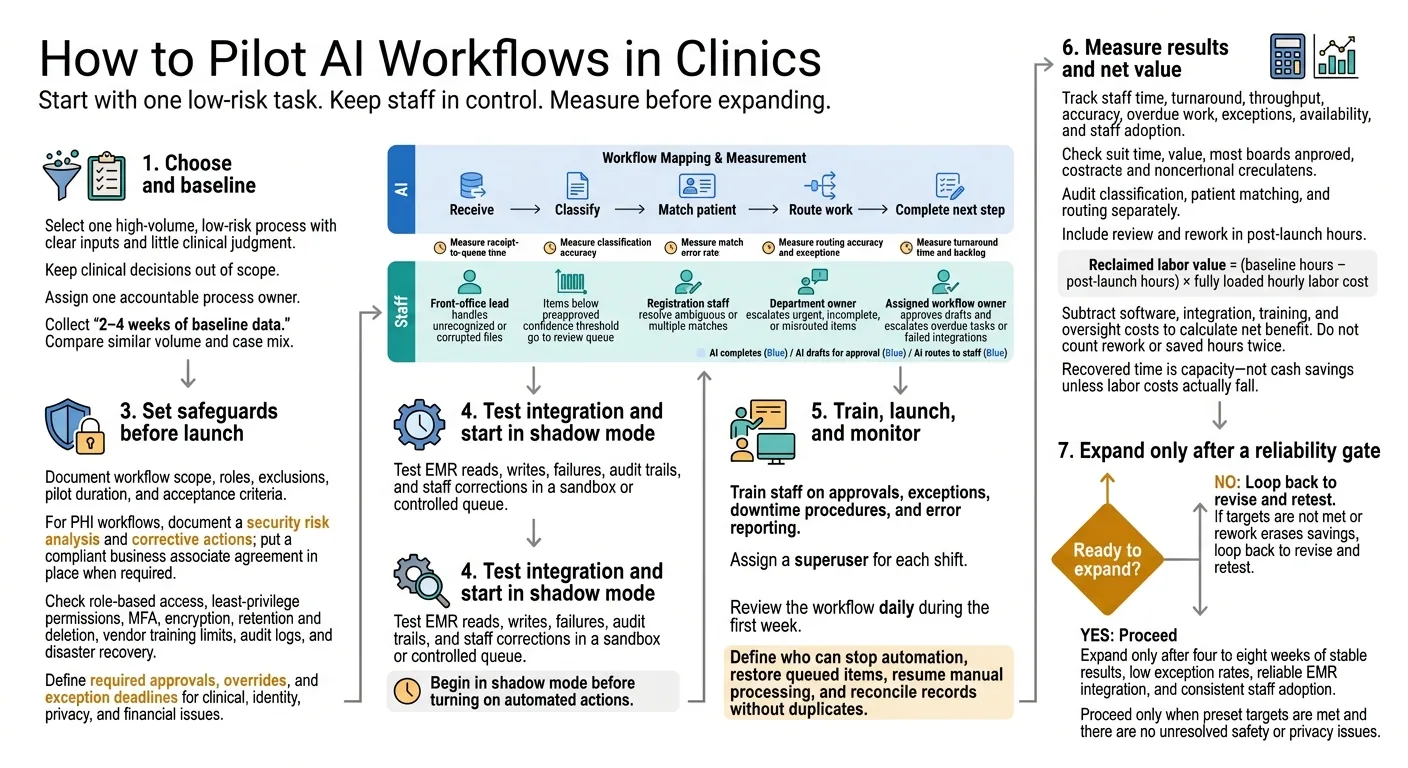
How to Pilot AI Workflows in Clinics
Once you’ve chosen clear AI use cases, move from selecting tasks to a controlled rollout.
Map the Process and Run a Pilot
Start with one high-volume, low-risk process that has clear inputs and requires little clinical judgment. Keep clinical decisions out of scope. Assign one owner who’s accountable for the process, such as the practice administrator.
Map intake channels, required fields, handoffs, approvals, dependencies, and exceptions. For each action, specify whether AI can complete it, draft it for approval, or only route it to staff. Use this same rollout approach for fax intake, referral tracking, and message routing.
| Step | Manual process | AI-assisted process | Owner and escalation | Measure |
|---|---|---|---|---|
| Receive | Staff monitor fax or inbox | AI detects and ingests the item | Front-office lead handles unrecognized or corrupted files | Receipt-to-queue time |
| Classify | Staff read and label it | AI assigns document type and confidence score | Items below the preapproved confidence threshold go to a review queue | Classification accuracy |
| Match patient | Staff search the EMR and enter identifiers | AI proposes a patient match | Registration staff resolve ambiguous or multiple matches | Match error rate |
| Route work | Staff forward or re-key information | AI routes to the correct queue | Department owner escalates urgent, incomplete, or misrouted items | Routing accuracy and exceptions |
| Complete next step | Staff schedule, request records, or seek authorization | AI creates a task or draft | Assigned workflow owner approves drafts and escalates overdue tasks or failed integrations | Turnaround time and backlog |
Before launch, define the location, specialty, workflow scope, systems, roles, launch date, pilot duration, exclusions, and clear acceptance criteria. Test EMR integration in a sandbox or controlled queue. Check reads, writes, failures, audit trails, and staff corrections.
Begin in shadow mode before turning on automated actions. Train staff on approvals, exceptions, downtime procedures, and error reporting, and assign a superuser for each shift. Review the workflow daily during the first week. Document who can stop automation, restore queued items, resume manual processing, and reconcile records without creating duplicates.
Set HIPAA Safeguards and Human Review Rules
For workflows that handle PHI, document a security risk analysis and corrective actions before launch.[4][8] Put a compliant business associate agreement in place when the vendor’s handling of PHI requires one.[4][9]
Review role-based access, least-privilege permissions, MFA, encryption, retention and deletion, vendor training limits, audit logs, and disaster recovery. Check that logs let you examine activity involving PHI.[4][10]
Write an approval matrix that defines automatic actions, required approvals, overrides, and exception deadlines for clinical, identity, privacy, and financial issues. During downtime, record timestamps and use the manual queue. Reconcile every item after recovery.
Measure Results and Calculate ROI
Compare each pilot against 2 to 4 weeks of baseline data, using similar volume and case mix. Audit classification, patient matching, and routing separately. One strong score shouldn’t hide a serious failure elsewhere.
Use the pilot to test the workflow before expanding it. The table below measures the process you mapped. These suggested, clinic-defined thresholds are not promised results.
| Goal | Baseline → post-launch measure | Review frequency | Suggested acceptance threshold |
|---|---|---|---|
| Reduce manual work | Staff minutes per item and total labor hours per week | Weekly | At least 20% reduction without added rework |
| Improve turnaround | Median and 90th-percentile receipt-to-completion time | Daily during launch; weekly afterward | 25% faster median turnaround |
| Increase throughput | Items completed per staff member and total queue volume | Weekly | 15% more completed items at equal or lower workload |
| Maintain accuracy | Correct classification, patient match, routing, and data-entry rates | Daily sample and monthly audit | At least 98% on routine items |
| Reduce overdue work | Number and age of open tasks or referrals | Daily | No increase in items older than the clinic’s limit |
| Control exceptions | Exception rate, rework rate, and escalation resolution time | Daily during launch | Fewer than 2% unresolved exceptions |
| Protect availability | Integration failures, downtime minutes, and recovered items | Per incident and monthly | Zero lost items; documented reconciliation |
| Support staff adoption | Surveyed workload, override rate, training completion, and use of the approved queue | Weekly during pilot | At least 90% training completion and positive adoption trend |
Calculate reclaimed labor value in U.S. dollars:
Reclaimed labor value = (baseline hours − post-launch hours) × fully loaded hourly labor cost
The hourly cost should include wages, payroll taxes, benefits, and other labor costs. Include review and rework in post-launch hours. Then subtract software, integration, training, and oversight costs to calculate net benefit, without counting rework twice.
Net ROI = (net annual benefit ÷ total implementation and operating costs) × 100%
Treat recovered time as capacity, not cash savings, unless labor costs actually fall. Never count the same hours twice. Expand only after four to eight weeks of stable results, low exception rates, reliable EMR integration, and consistent staff adoption.
The next section shows how these rollout rules apply in a specialty-clinic deployment.
How Diagna Supports Specialty Clinic Staff
In specialty clinics, Diagna applies the same workflow principles to fax intake, referrals, and front-office routing. Its front-office automation tools serve independent U.S. specialty groups with 5 to 50 providers, including cardiology, pulmonology, orthopedics, pain management, infusion, radiology, and rheumatology.[1]
For clinics handling large volumes of faxes and referrals, intake and routing offer a place to start.
FAXFlo and Referral Manager
FAXFlo receives, reads, categorizes, and routes incoming faxes, cutting down on manual sorting and filing. Referral Manager tracks inbound referrals from receipt through a scheduled appointment. Together, they help staff see what arrived, what needs review, and what remains open.
Staff still handle missing information, duplicate referrals, and uncertain patient matches. Referral tracking does not guarantee scheduling or completion.
EMR Integration and Staff Review
Diagna says its tools work alongside existing EMRs rather than replacing them. Before deployment, check compatibility with your EMR, including patient matching, write-back fields, routing destinations, user permissions, and exception handling. Follow the earlier human-review rule: use Diagna’s staff-review dashboard to review, edit, or approve fields before sync.[1][2]
Diagna states that it is HIPAA-compliant and signs a business associate agreement before handling fax data.[1][11] Check those claims through your own compliance review. Confirm the BAA, PHI handling, audit logs, retention terms, and staff-approval rules. For items requiring approval, staff review is the final gate before information reaches the chart.
Diagna's Reported Deployment Results
Measured gains matter only when compared with your clinic’s baseline. Diagna reports 4+ staff hours saved per day, 20+ hours per week, and 98%+ document-processing accuracy in deployments.[1] These are company-reported figures, not guaranteed outcomes. Do not add the daily and weekly figures together.
Ask for the measurement period, document volume, task scope, accuracy definition, error severity, and remaining review workload. Document-processing accuracy does not equal end-to-end referral success. Test the claims against your clinic’s baseline before using them to make staffing or budget decisions.
Conclusion: Pilot One Workflow Before Expanding
Once you’ve mapped the process and set safeguards, run a controlled pilot. By coordinating intake and follow-up, AI can cut administrative work, improve routing, and give staff more time for patients. But those gains depend on EMR integration, privacy safeguards, and human review.
Measure staff time saved, workload reduction, and rework - not just processing speed. Factor training, review, troubleshooting, and recurring costs into ROI. Ask staff directly whether the workflow lightens their workload.
Test one workflow against one baseline. Expand only when it meets preset reliability and adoption targets and has no unresolved safety or privacy issues. If rework wipes out the savings, revise the workflow before scaling.
Start with one workflow, prove the results, then scale.
FAQs
How can a small clinic pilot AI without disrupting patient care?
Start with a low-risk, high-volume administrative task, like fax triage or referral tracking. Run a controlled 60- to 90-day pilot. Measure processing times and error rates before the pilot so you can compare them with AI performance.
Keep staff involved: Have them review and verify AI-classified documents before taking final action. Add AI to your existing EMR workflows to cut manual sorting and ease the transition for your team.
What should we do if AI errors persist?
AI flags uncertain items or errors for human review instead of guessing [1][2]. If an error persists or a document is unclear, the system automatically sends it to a designated staff review queue, where reviewers can see the original document and extracted data side by side [2]. Staff should verify AI classifications and extracted data before taking final action, such as creating orders or scheduling appointments [3].
How can we verify Diagna’s results for our clinic?
Start by measuring your current document volume, processing times, and error rates. Then run a 60- to 90-day pilot alongside manual workflows. Have staff compare AI classification and data extraction with manual results.
Track classification accuracy, exception rates, and the time needed to schedule appointments. Use the results to adjust confidence thresholds and verify measurable staff time savings and efficiency gains before switching to full automation.
Fax management
Diagna reads every fax within minutes, 24/7. It sorts it, matches the patient, and sends it to the right person.
See how Diagna automates fax management