Ultimate Guide to Prior Authorization Workflow Automation
Healthcare Technology
Healthcare Technology
How AI-driven prior authorization automation cuts time, reduces denials and costs, and streamlines EMR integration for faster patient care.
How AI-driven prior authorization automation cuts time, reduces denials and costs, and streamlines EMR integration for faster patient care.

Prior authorization (PA) automation can save your clinic time, reduce costs, and improve patient care. Here's how:
Manual PA is slow and error-prone: Clinics spend 15–20 minutes per request, leading to delays, denials, and staff burnout.
Automation solves these issues: AI-powered tools cut processing time to under 5 minutes, handle up to 87% of requests without human input, and reduce costs by 60%.
Key benefits include: Faster approvals, fewer denials, increased revenue, and more time for staff to focus on complex cases.
The process works like this: Automation pulls data from your EMR, checks payer requirements, compiles documentation, and submits requests electronically. It also tracks status updates and flags exceptions for review. Even fax-based workflows can be digitized with intelligent tools.
Results clinics have seen:
50% faster submissions
91% first-pass success rates
24 staff hours saved daily for a 5-person team
AI for Faster Prior Authorizations in Healthcare #priorauthorization #automation #Patientcare
Understanding the Prior Authorization Workflow
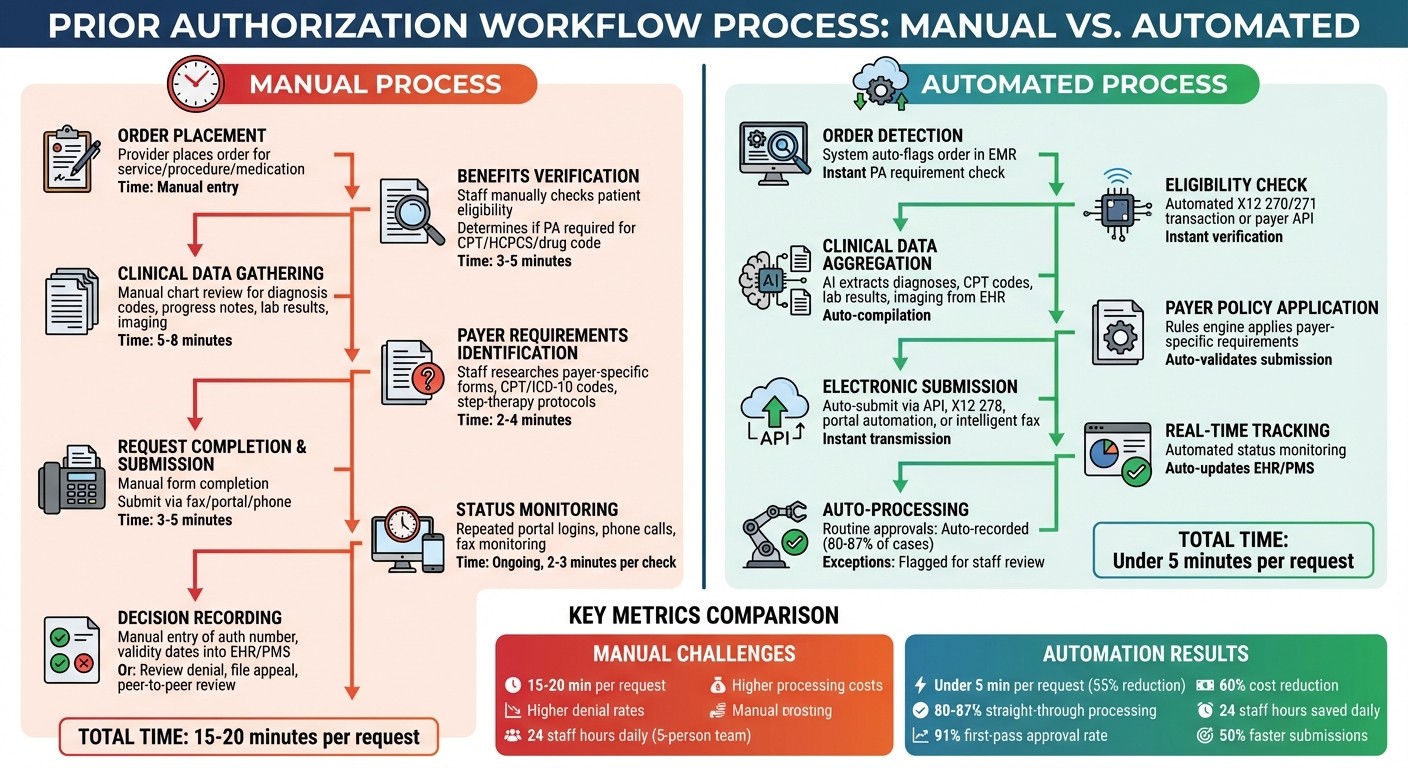
Prior Authorization Workflow: Manual vs Automated Process Steps
Steps in the Prior Authorization Process
The process of prior authorization (PA) generally follows a set pattern, but manual handling at each step can lead to delays. It starts with a provider placing an order for a service, procedure, imaging study, or medication that may need approval from the payer. The next step involves verifying the patient’s benefits and eligibility to ensure active coverage and to determine if PA is required for the specific CPT/HCPCS or drug code under their plan.
If PA is necessary, clinical data - such as diagnosis codes, progress notes, lab results, and imaging - must be gathered to support the request. Then, the payer-specific requirements are identified. This includes determining the correct PA forms, required CPT/ICD-10 codes, step-therapy protocols, and the necessary documentation. Once all the information is ready, the request is completed and submitted through the payer’s approved channels.
After submission, staff must monitor the request’s status across portals and fax systems, responding promptly to any additional information requests from the payer. If the PA is approved, the authorization number, validity dates, and approved services are recorded in the EHR and practice management system, and scheduling is coordinated. If the PA is denied or partially approved, clinical and revenue cycle teams review the reasons for denial. They may modify the order, file an appeal, or initiate a peer-to-peer review. This process often repeats for reauthorizations or renewals, especially for ongoing treatments or chronic care.
Several challenges can cause bottlenecks in this process. Determining payer requirements is particularly tricky, as each payer and plan may have different rules regarding when PA is needed, which codes are covered, and the clinical criteria required. Collecting documentation is another labor-intensive step, often requiring staff to manually search through charts and systems. Missing or incomplete documentation is a leading cause of denials and rework. Additionally, tracking the status of PA requests can be time-consuming, involving repeated logins to portals, phone calls, and monitoring faxes. Delays in this step can result in postponed treatments, rescheduling, and patient dissatisfaction.
A well-defined understanding of roles within the PA workflow can help streamline the process, as outlined below.
Who's Involved in Prior Authorization
Several roles are critical to the PA process, and clearly assigning tasks can help avoid unnecessary delays. Ordering providers - such as physicians, nurse practitioners, and physician assistants - are responsible for making clinical decisions, documenting medical necessity, and sometimes participating in peer-to-peer reviews or appeals for denied requests. Clinical support staff, including nurses and medical assistants, assist by gathering the necessary documentation and flagging orders that require PA.
Centralized prior authorization specialists or coordinators handle payer-specific requirements, complete forms, and submit requests through portals, fax, or electronic transactions. Meanwhile, billing and revenue cycle staff manage the PA status, update systems with authorization details, and handle denials, appeals, and reauthorizations.
On the payer side, utilization management teams review PA requests, apply their coverage policies, and issue decisions or requests for additional information. For medications, pharmacies and pharmacy benefit managers (PBMs) manage drug-specific PA workflows, which often mirror the general steps. Lastly, patients play a role by providing accurate insurance and demographic information, choosing in-network providers, and sometimes assisting with benefits questions or financial counseling. Unfortunately, they are often the ones most affected by delays, facing postponed care and unexpected bills.
To reduce confusion, clinics can implement a RACI-style map (Responsible, Accountable, Consulted, Informed) that assigns specific tasks to defined roles for each PA step. By explicitly detailing task ownership in internal procedures, training materials, and workflow diagrams, clinics can minimize ad-hoc handoffs, clarify escalation paths, and integrate automation tools like Diagna's Prior Auth Bot to handle routine, rule-based tasks while routing exceptions to the appropriate staff.
With responsibilities clearly defined, the next step is mastering the intricacies of payer-specific policies.
Understanding U.S. Payer Policy Requirements
Payers rely on procedure and product codes - CPT and HCPCS for services, and NDCs for medications - along with ICD-10 diagnosis codes to decide which services require prior authorization and under what conditions. For example, a high-cost imaging CPT code may only need PA when paired with certain diagnostic codes or if performed in an outpatient setting. On the pharmacy side, formularies and drug utilization rules dictate which NDC-coded medications require PA, step therapy, or quantity limits.
Some common utilization management policies include:
Step therapy protocols, which require patients to try cost-effective treatments before moving to more expensive options.
Site-of-care rules, which may favor certain treatment locations, such as ambulatory infusion centers over hospital outpatient departments.
Quantity and duration limits, which cap the amount of a drug or service provided within a specific timeframe.
Criteria based on age, diagnosis, or severity, often tied to evidence-based guidelines.
These policies influence PA decisions by determining whether a request meets coverage criteria and specifying the necessary documentation, such as prior treatment failures, test results, or clinical scoring scales.
To avoid unnecessary PAs or denials, clinics must ensure accurate and specific codes are captured during order entry. However, keeping up with payer-specific code lists and policies is challenging, as they frequently change. Manual updates to policy mappings are time-consuming and error-prone. Advanced automation platforms help by using rules engines and payer knowledgebases that update policy rules in near real time. One vendor highlighted the ability to manage 1.3 million rules across 300+ health plans, emphasizing the complexity of U.S. payer policies and the importance of maintaining accurate workflows.
Benefits of Prior Authorization Automation
Solving Manual Workflow Problems
Handling prior authorizations manually is a time-consuming and error-prone process for U.S. clinics. Staff typically spend 15–20 minutes per request gathering documentation, completing forms, and submitting them via fax or payer portals. The process doesn’t end there - tracking each request often involves repeated phone calls, logging into portals, and checking fax confirmations. These inefficiencies not only slow down workflows but also lead to incomplete submissions and missed requirements, increasing denial rates and creating more work for the staff.
Automation steps in to solve these issues by eliminating repetitive tasks. AI-powered systems can extract essential clinical data - like diagnoses, CPT/HCPCS codes, lab results, and imaging - from EHRs and automatically compile complete prior authorization packets. Instead of relying on fax or phone, these systems use electronic submission methods, such as X12 278 transactions, APIs, or intelligent portal automation. They also monitor the status of requests in real time and update the EHR automatically. Some platforms can process authorizations in under five minutes, compared to the 15–20 minutes needed for manual handling. This efficiency can save a five-person team up to 24 staff hours each day. By ensuring submissions meet payer requirements from the start, automation reduces preventable denials and allows staff to focus on complex cases that genuinely need human oversight.
Core Automation Features
Automation offers powerful tools to address inefficiencies in prior authorization workflows. Leading platforms integrate seamlessly with existing EHR systems, streamlining the entire submission process. AI-driven data extraction pulls information from both structured fields and unstructured clinical notes, ensuring that only the necessary data is included, without requiring staff to manually comb through charts.
Rules engines and knowledgebases are another key feature. These systems ensure compliance with payer policies, managing millions of rules across hundreds of health plans. They automatically determine if prior authorization is required and identify the necessary documentation. Real-time tracking capabilities keep tabs on payer responses, updating authorization numbers, validity dates, and decisions directly in practice management systems. Routine approvals can be processed automatically, while edge cases are flagged for staff review. Analytics dashboards provide insights into metrics like denial rates, turnaround times, and overall automation performance, helping clinics identify areas for improvement.
For clinics still reliant on fax-heavy workflows, intelligent fax automation bridges the gap between traditional methods and modern electronic systems. AI tools classify and extract data - such as demographics, insurance details, and clinical information - from faxed forms and supporting documents, then auto-populate requests and patient records. Solutions like Diagna's Prior Auth Bot, paired with tools like FAXFlo, help digitize workflows even when payers haven’t fully modernized their systems. These features minimize manual intervention while ensuring compatibility with any U.S. EMR, making the transition to automated workflows smoother and more efficient.
Measurable Results from Automation
The benefits of automation are backed by measurable outcomes in clinic efficiency and cost savings. Automation can reduce processing time by about 11 minutes per request - a 55% reduction. In some cases, it slashes the overall effort required for prior authorizations by up to 90%. For instance, Atlantic Health System reported cutting their average submission time by more than half and gaining an additional eight days of lead time for starting authorizations. This directly improved scheduling flexibility and reduced delays in patient care. Some platforms achieve straight-through processing rates of 80–87%, allowing teams to handle more requests without increasing staff.
Cost savings are another major advantage. Automated systems can save approximately $9.60 per authorization by reducing manual handling. Some solutions report cutting existing authorization costs by 60%. On a larger scale, the adoption of electronic prior authorization could save the U.S. healthcare system over $449 million annually. By embedding payer rules and validating submissions upfront, automation increases first-pass approval rates. One ambulatory surgery center, for example, achieved a 91% success rate for initial submissions after implementing automation.
Perhaps the most critical benefit is improved patient access to care. Faster authorizations mean patients can schedule tests, procedures, or specialty visits sooner, with fewer cancellations due to pending approvals. Delays in prior authorizations are a serious issue - one in three U.S. providers report that such delays have led to adverse patient outcomes. Automation reduces these bottlenecks, leading to better clinical outcomes. For example, Atlantic Health System’s automation efforts contributed to a 97% clearance rate in accounts receivable, reflecting faster reimbursements and smoother patient care progression. Metrics like turnaround times, denial rates, staff hours saved, and reduced patient wait times highlight the transformative impact automation has on both clinical and operational workflows.
Building an Automated Prior Authorization Workflow
Core Components of Automated Workflows
Creating a streamlined automated prior authorization (PA) workflow involves integrating key steps into a seamless process. It all starts with order detection within your EMR. When a clinician places an order for imaging, a procedure, or specialty medication, the system flags it and checks if PA is required. This is followed by an eligibility and PA-requirement check, using X12 270/271 transactions or payer APIs to confirm the patient’s coverage and determine whether the service needs prior approval.
If a PA is needed, the system proceeds to clinical data aggregation. Automation tools pull essential information - such as diagnoses, CPT codes, lab results, and imaging reports - directly from the EMR. This data is then compiled into a payer-specific packet, validated for accuracy, and submitted via API, X12 278, portal automation, or even fax.
Once submitted, the workflow shifts to status monitoring. Automated bots track payer portals or parse X12 responses to follow up on submissions, initiate reauthorizations, and flag exceptions like denials or requests for additional information. Staff are only notified in these edge cases, while routine approvals are processed automatically. Some platforms achieve straight-through processing rates as high as 80–87%. This approach allows staff to focus on complex cases, boosting overall efficiency and reducing manual workloads.
Technical and Integration Needs
For an automated PA workflow to integrate smoothly with existing systems, attention to technical standards and compliance is crucial. The backbone of this integration lies in HL7 v2 and FHIR APIs, which enable the automation platform to pull order data, demographics, and clinical notes from the EMR without disrupting the clinician's workflow. Modern solutions act as a silent integration layer, working behind the scenes while providers continue using their familiar EMR interfaces.
On the payer side, the system must handle X12 transactions, particularly 270/271 for eligibility checks and 278 for PA requests and responses. For payers that lack electronic support, robotic process automation (RPA) can step in to log into portals and submit requests, while intelligent fax handling serves as a fallback option. A bidirectional data flow ensures that information flows seamlessly between the automation engine and your EMR or practice management system, keeping everything synchronized.
HIPAA compliance is a must. Any solution should function as a HIPAA Business Associate, offering encryption for data in transit and at rest, role-based access controls, and detailed audit trails for PHI access. Clinics should also ensure that vendors use U.S.-based data centers, undergo third-party security assessments, and provide clear data retention and deletion policies. To minimize disruptions, it’s wise to start with a single service line or payer, then expand incrementally once performance is validated.
Automating Fax-Based Prior Authorization
Even in an increasingly digital world, fax remains a key method for many U.S. payers and specialties. Automation platforms tackle this challenge by using AI-powered OCR and document classification to transform faxed PA forms and supporting documents into structured, actionable data. When a fax arrives, the system identifies the document type - whether it’s a PA request, denial letter, or approval - and extracts critical details like patient demographics, insurance information, CPT codes, and clinical notes. It then matches the document to the correct patient and order in the EMR.
Tools like Diagna's FAXFlo illustrate how this works. FAXFlo consolidates all incoming documents - whether they arrive via fax, email, or direct upload - into a unified inbox. Smart classification organizes each document, while AI agents extract the necessary data to auto-populate PA packets or update the relevant patient chart. This eliminates the manual bottleneck that fax often creates, turning it into just another transport channel in a fully digital workflow. Even when payers haven’t modernized their systems, your clinic can still benefit from automation.
Implementing and Improving PA Automation
Implementation Steps
Rolling out PA automation requires a structured approach to ensure smooth integration and dependable results. Start with a 2–4 week assessment to evaluate your current PA workload. Break it down by payer, service line, and submission method (fax, portal, or phone). Use this time to establish a baseline: measure how long it takes to submit an authorization, calculate weekly staff hours spent on PAs, track denial rates, and note the average time from order placement to payer decision. Map out every step of your current process - from entering the order into your EMR to recording the final decision - while identifying pain points like manual chart reviews, duplicate data entry, or spreadsheet-based tracking.
Next, spend 3–6 weeks selecting an automation solution. Look for one that integrates seamlessly with your EMR using HL7 or FHIR, supports EDI 278 transactions, automates portal workflows, and handles fax processes. For organizations heavily reliant on fax, consider solutions that streamline fax triage directly into your EMR.
Begin with a 4–8 week pilot program in a single department, such as orthopedics or imaging, and focus on a small group of payers. During this phase, run the automation alongside manual processes to ensure accuracy and completeness. Establish clear guidelines for when cases should be automated and when they require manual review, such as instances involving missing clinical data or high-cost medications. Train staff on the new workflows, emphasizing that automation will handle routine cases while exceptions will still need human oversight. Once the pilot shows consistent results, gradually expand automation to other departments and payers over the next 8–12 weeks, continually refining rules and templates based on performance data.
After full implementation, measure the system’s impact using well-defined metrics to evaluate both operational and financial outcomes.
Metrics to Track Performance
Tracking the right metrics helps gauge whether automation is meeting expectations. One key metric is the average time from order to authorization. Effective automation can reduce this from 15–20 minutes to under 5 minutes. Monitor staff time saved weekly or in terms of full-time equivalents (FTEs). For instance, Orbit Healthcare reports their AI-driven PA workflows save up to 24 staff hours daily and reduce PA processing costs by about 60% for teams with five or more PA staff. Another important measure is the percentage of authorizations handled completely by automation, with benchmarks typically ranging from 80% to 87%. According to Janus Health, up to 87% of authorizations can be processed without staff intervention.
Keep an eye on approval and denial rates, breaking down denials by reasons such as incomplete documentation, expired authorizations, or eligibility mismatches. For example, Waystar’s case study with Atlantic Health System showed a 50% reduction in average submission time for authorizations, an 8-day increase in lead time for starting authorizations, and a 97% DAR (discharged, awaiting resolution) clearance rate after implementing workflow automation.
Additionally, track the financial impact by monitoring metrics like authorization-related write-offs, revenue at risk, and changes in days in accounts receivable. Patient access metrics, such as delays or cancellations caused by pending authorizations, are equally important. Delays in PA processing can negatively affect patient outcomes, making it essential to measure and address these issues.
These metrics not only provide insights into the system’s performance but also guide ongoing improvements.
Ongoing Optimization Methods
Automation isn’t a one-and-done solution. Regularly reviewing and tweaking the system ensures it stays effective. Use analytics dashboards monthly to spot payers or CPT/HCPCS codes with unusually high denial or delay rates. Update rule sets and templates to address specific issues, such as incomplete documentation. This might involve creating standardized clinical checklists or pre-mapped order sets tailored to payer requirements. Assign a team to monitor and update payer policies promptly, and consider automation solutions that can adjust rule sets in real time.
Gather staff feedback through weekly huddles or shared reporting tools to identify edge cases or inefficiencies. Many modern automation tools include self-learning features that adapt based on real-world payer responses, improving accuracy and reliability over time. Share success stories - like reduced backlogs, faster patient scheduling, or saved staff hours - to build confidence and maintain team engagement.
As you scale, follow an iterative process: analyze performance data, pinpoint problem areas, adjust configurations, and validate results. This cycle of continuous improvement ensures that your automation keeps pace with changing payer policies and your organization’s operational needs.
Conclusion
Automating prior authorization (PA) processes turns a traditionally tedious task into a streamlined, efficient workflow. The manual approach - taking 15–20 minutes per case and relying on outdated fax machines and portal systems - consumes valuable staff time, delays patient care, and inflates costs. By automating this process, the time required drops to under 5 minutes, with 80–87% of authorizations processed without human intervention. This shift not only slashes processing costs by about 60% but also saves up to $9.60 per authorization, making a compelling case for automation’s role in healthcare operations.
The benefits extend beyond time and cost savings. Health systems have reported a 50% reduction in submission time, an increase of 8 days in service lead time, and a 97% clearance rate in accounts receivable. Ambulatory centers, on the other hand, achieve a 91% success rate in submissions and save an average of 15 minutes per authorization. These improvements lead to faster reimbursements, fewer denials, and a more predictable revenue cycle - key advantages in today’s challenging healthcare environment.
But the impact isn’t just operational; it directly enhances patient care. Faster approvals mean fewer delays, enabling patients to receive timely treatments and reducing the risk of cancellations. Staff, freed from repetitive data entry, can focus on resolving critical exceptions and engaging more meaningfully with patients, which helps alleviate burnout. Considering that one in three U.S. providers report adverse events tied to PA delays, automation addresses a significant patient safety issue.
To achieve these outcomes, success hinges on several factors: seamless integration with electronic health records (EHR), support for multiple communication channels (like fax and electronic systems), and ongoing performance tracking. Starting with high-volume, delay-prone service lines, piloting the system, and scaling gradually ensures a smoother transition and better results. Clinics that treat PA automation as a strategic investment in improving patient access see the most significant gains in efficiency, revenue, and care quality.
For clinics looking to modernize their workflows, an AI-powered solution like Diagna can integrate effortlessly with existing EHRs, optimize outdated systems, and deliver real improvements in both operational efficiency and patient care.
FAQs
How can automating prior authorization workflows make clinics more efficient?
Automation takes the hassle out of prior authorization by managing tedious tasks such as completing forms, organizing documents, and keeping track of approvals. This not only cuts down on administrative delays but also reduces mistakes and speeds up follow-ups, helping clinics save valuable time and avoid losing revenue.
With these processes automated, clinics can dedicate more energy to patient care while ensuring their workflows remain accurate and secure.
What are the technical requirements for automating prior authorizations in existing systems?
To make prior authorization automation work effectively, the system needs to work effortlessly with major EMRs, allowing for secure data exchange and real-time data extraction. It should align with current workflows, provide API connectivity, and strictly adhere to HIPAA regulations. Key features like automatic data classification and smooth push-pull functionality are crucial to improving both the accuracy and efficiency of the process.
How can clinics keep up with changing payer policies in automated workflows?
Clinics can keep pace with evolving payer policies by leveraging AI-powered automation tools like Diagna. These tools are built to adjust to policy changes as they happen, helping clinics maintain compliance and keep their workflows running smoothly.
To ensure they stay compliant, clinics should also:
Frequently review communications from payers for any updates.
Integrate automated systems to handle policy changes within their workflows.
By blending consistent monitoring with smart automation, clinics can simplify their processes and minimize delays or mistakes that might arise from shifting policies.
Related Blog Posts
Prior authorization (PA) automation can save your clinic time, reduce costs, and improve patient care. Here's how:
Manual PA is slow and error-prone: Clinics spend 15–20 minutes per request, leading to delays, denials, and staff burnout.
Automation solves these issues: AI-powered tools cut processing time to under 5 minutes, handle up to 87% of requests without human input, and reduce costs by 60%.
Key benefits include: Faster approvals, fewer denials, increased revenue, and more time for staff to focus on complex cases.
The process works like this: Automation pulls data from your EMR, checks payer requirements, compiles documentation, and submits requests electronically. It also tracks status updates and flags exceptions for review. Even fax-based workflows can be digitized with intelligent tools.
Results clinics have seen:
50% faster submissions
91% first-pass success rates
24 staff hours saved daily for a 5-person team
AI for Faster Prior Authorizations in Healthcare #priorauthorization #automation #Patientcare
Understanding the Prior Authorization Workflow
Prior Authorization Workflow: Manual vs Automated Process Steps
Steps in the Prior Authorization Process
The process of prior authorization (PA) generally follows a set pattern, but manual handling at each step can lead to delays. It starts with a provider placing an order for a service, procedure, imaging study, or medication that may need approval from the payer. The next step involves verifying the patient’s benefits and eligibility to ensure active coverage and to determine if PA is required for the specific CPT/HCPCS or drug code under their plan.
If PA is necessary, clinical data - such as diagnosis codes, progress notes, lab results, and imaging - must be gathered to support the request. Then, the payer-specific requirements are identified. This includes determining the correct PA forms, required CPT/ICD-10 codes, step-therapy protocols, and the necessary documentation. Once all the information is ready, the request is completed and submitted through the payer’s approved channels.
After submission, staff must monitor the request’s status across portals and fax systems, responding promptly to any additional information requests from the payer. If the PA is approved, the authorization number, validity dates, and approved services are recorded in the EHR and practice management system, and scheduling is coordinated. If the PA is denied or partially approved, clinical and revenue cycle teams review the reasons for denial. They may modify the order, file an appeal, or initiate a peer-to-peer review. This process often repeats for reauthorizations or renewals, especially for ongoing treatments or chronic care.
Several challenges can cause bottlenecks in this process. Determining payer requirements is particularly tricky, as each payer and plan may have different rules regarding when PA is needed, which codes are covered, and the clinical criteria required. Collecting documentation is another labor-intensive step, often requiring staff to manually search through charts and systems. Missing or incomplete documentation is a leading cause of denials and rework. Additionally, tracking the status of PA requests can be time-consuming, involving repeated logins to portals, phone calls, and monitoring faxes. Delays in this step can result in postponed treatments, rescheduling, and patient dissatisfaction.
A well-defined understanding of roles within the PA workflow can help streamline the process, as outlined below.
Who's Involved in Prior Authorization
Several roles are critical to the PA process, and clearly assigning tasks can help avoid unnecessary delays. Ordering providers - such as physicians, nurse practitioners, and physician assistants - are responsible for making clinical decisions, documenting medical necessity, and sometimes participating in peer-to-peer reviews or appeals for denied requests. Clinical support staff, including nurses and medical assistants, assist by gathering the necessary documentation and flagging orders that require PA.
Centralized prior authorization specialists or coordinators handle payer-specific requirements, complete forms, and submit requests through portals, fax, or electronic transactions. Meanwhile, billing and revenue cycle staff manage the PA status, update systems with authorization details, and handle denials, appeals, and reauthorizations.
On the payer side, utilization management teams review PA requests, apply their coverage policies, and issue decisions or requests for additional information. For medications, pharmacies and pharmacy benefit managers (PBMs) manage drug-specific PA workflows, which often mirror the general steps. Lastly, patients play a role by providing accurate insurance and demographic information, choosing in-network providers, and sometimes assisting with benefits questions or financial counseling. Unfortunately, they are often the ones most affected by delays, facing postponed care and unexpected bills.
To reduce confusion, clinics can implement a RACI-style map (Responsible, Accountable, Consulted, Informed) that assigns specific tasks to defined roles for each PA step. By explicitly detailing task ownership in internal procedures, training materials, and workflow diagrams, clinics can minimize ad-hoc handoffs, clarify escalation paths, and integrate automation tools like Diagna's Prior Auth Bot to handle routine, rule-based tasks while routing exceptions to the appropriate staff.
With responsibilities clearly defined, the next step is mastering the intricacies of payer-specific policies.
Understanding U.S. Payer Policy Requirements
Payers rely on procedure and product codes - CPT and HCPCS for services, and NDCs for medications - along with ICD-10 diagnosis codes to decide which services require prior authorization and under what conditions. For example, a high-cost imaging CPT code may only need PA when paired with certain diagnostic codes or if performed in an outpatient setting. On the pharmacy side, formularies and drug utilization rules dictate which NDC-coded medications require PA, step therapy, or quantity limits.
Some common utilization management policies include:
Step therapy protocols, which require patients to try cost-effective treatments before moving to more expensive options.
Site-of-care rules, which may favor certain treatment locations, such as ambulatory infusion centers over hospital outpatient departments.
Quantity and duration limits, which cap the amount of a drug or service provided within a specific timeframe.
Criteria based on age, diagnosis, or severity, often tied to evidence-based guidelines.
These policies influence PA decisions by determining whether a request meets coverage criteria and specifying the necessary documentation, such as prior treatment failures, test results, or clinical scoring scales.
To avoid unnecessary PAs or denials, clinics must ensure accurate and specific codes are captured during order entry. However, keeping up with payer-specific code lists and policies is challenging, as they frequently change. Manual updates to policy mappings are time-consuming and error-prone. Advanced automation platforms help by using rules engines and payer knowledgebases that update policy rules in near real time. One vendor highlighted the ability to manage 1.3 million rules across 300+ health plans, emphasizing the complexity of U.S. payer policies and the importance of maintaining accurate workflows.
Benefits of Prior Authorization Automation
Solving Manual Workflow Problems
Handling prior authorizations manually is a time-consuming and error-prone process for U.S. clinics. Staff typically spend 15–20 minutes per request gathering documentation, completing forms, and submitting them via fax or payer portals. The process doesn’t end there - tracking each request often involves repeated phone calls, logging into portals, and checking fax confirmations. These inefficiencies not only slow down workflows but also lead to incomplete submissions and missed requirements, increasing denial rates and creating more work for the staff.
Automation steps in to solve these issues by eliminating repetitive tasks. AI-powered systems can extract essential clinical data - like diagnoses, CPT/HCPCS codes, lab results, and imaging - from EHRs and automatically compile complete prior authorization packets. Instead of relying on fax or phone, these systems use electronic submission methods, such as X12 278 transactions, APIs, or intelligent portal automation. They also monitor the status of requests in real time and update the EHR automatically. Some platforms can process authorizations in under five minutes, compared to the 15–20 minutes needed for manual handling. This efficiency can save a five-person team up to 24 staff hours each day. By ensuring submissions meet payer requirements from the start, automation reduces preventable denials and allows staff to focus on complex cases that genuinely need human oversight.
Core Automation Features
Automation offers powerful tools to address inefficiencies in prior authorization workflows. Leading platforms integrate seamlessly with existing EHR systems, streamlining the entire submission process. AI-driven data extraction pulls information from both structured fields and unstructured clinical notes, ensuring that only the necessary data is included, without requiring staff to manually comb through charts.
Rules engines and knowledgebases are another key feature. These systems ensure compliance with payer policies, managing millions of rules across hundreds of health plans. They automatically determine if prior authorization is required and identify the necessary documentation. Real-time tracking capabilities keep tabs on payer responses, updating authorization numbers, validity dates, and decisions directly in practice management systems. Routine approvals can be processed automatically, while edge cases are flagged for staff review. Analytics dashboards provide insights into metrics like denial rates, turnaround times, and overall automation performance, helping clinics identify areas for improvement.
For clinics still reliant on fax-heavy workflows, intelligent fax automation bridges the gap between traditional methods and modern electronic systems. AI tools classify and extract data - such as demographics, insurance details, and clinical information - from faxed forms and supporting documents, then auto-populate requests and patient records. Solutions like Diagna's Prior Auth Bot, paired with tools like FAXFlo, help digitize workflows even when payers haven’t fully modernized their systems. These features minimize manual intervention while ensuring compatibility with any U.S. EMR, making the transition to automated workflows smoother and more efficient.
Measurable Results from Automation
The benefits of automation are backed by measurable outcomes in clinic efficiency and cost savings. Automation can reduce processing time by about 11 minutes per request - a 55% reduction. In some cases, it slashes the overall effort required for prior authorizations by up to 90%. For instance, Atlantic Health System reported cutting their average submission time by more than half and gaining an additional eight days of lead time for starting authorizations. This directly improved scheduling flexibility and reduced delays in patient care. Some platforms achieve straight-through processing rates of 80–87%, allowing teams to handle more requests without increasing staff.
Cost savings are another major advantage. Automated systems can save approximately $9.60 per authorization by reducing manual handling. Some solutions report cutting existing authorization costs by 60%. On a larger scale, the adoption of electronic prior authorization could save the U.S. healthcare system over $449 million annually. By embedding payer rules and validating submissions upfront, automation increases first-pass approval rates. One ambulatory surgery center, for example, achieved a 91% success rate for initial submissions after implementing automation.
Perhaps the most critical benefit is improved patient access to care. Faster authorizations mean patients can schedule tests, procedures, or specialty visits sooner, with fewer cancellations due to pending approvals. Delays in prior authorizations are a serious issue - one in three U.S. providers report that such delays have led to adverse patient outcomes. Automation reduces these bottlenecks, leading to better clinical outcomes. For example, Atlantic Health System’s automation efforts contributed to a 97% clearance rate in accounts receivable, reflecting faster reimbursements and smoother patient care progression. Metrics like turnaround times, denial rates, staff hours saved, and reduced patient wait times highlight the transformative impact automation has on both clinical and operational workflows.
Building an Automated Prior Authorization Workflow
Core Components of Automated Workflows
Creating a streamlined automated prior authorization (PA) workflow involves integrating key steps into a seamless process. It all starts with order detection within your EMR. When a clinician places an order for imaging, a procedure, or specialty medication, the system flags it and checks if PA is required. This is followed by an eligibility and PA-requirement check, using X12 270/271 transactions or payer APIs to confirm the patient’s coverage and determine whether the service needs prior approval.
If a PA is needed, the system proceeds to clinical data aggregation. Automation tools pull essential information - such as diagnoses, CPT codes, lab results, and imaging reports - directly from the EMR. This data is then compiled into a payer-specific packet, validated for accuracy, and submitted via API, X12 278, portal automation, or even fax.
Once submitted, the workflow shifts to status monitoring. Automated bots track payer portals or parse X12 responses to follow up on submissions, initiate reauthorizations, and flag exceptions like denials or requests for additional information. Staff are only notified in these edge cases, while routine approvals are processed automatically. Some platforms achieve straight-through processing rates as high as 80–87%. This approach allows staff to focus on complex cases, boosting overall efficiency and reducing manual workloads.
Technical and Integration Needs
For an automated PA workflow to integrate smoothly with existing systems, attention to technical standards and compliance is crucial. The backbone of this integration lies in HL7 v2 and FHIR APIs, which enable the automation platform to pull order data, demographics, and clinical notes from the EMR without disrupting the clinician's workflow. Modern solutions act as a silent integration layer, working behind the scenes while providers continue using their familiar EMR interfaces.
On the payer side, the system must handle X12 transactions, particularly 270/271 for eligibility checks and 278 for PA requests and responses. For payers that lack electronic support, robotic process automation (RPA) can step in to log into portals and submit requests, while intelligent fax handling serves as a fallback option. A bidirectional data flow ensures that information flows seamlessly between the automation engine and your EMR or practice management system, keeping everything synchronized.
HIPAA compliance is a must. Any solution should function as a HIPAA Business Associate, offering encryption for data in transit and at rest, role-based access controls, and detailed audit trails for PHI access. Clinics should also ensure that vendors use U.S.-based data centers, undergo third-party security assessments, and provide clear data retention and deletion policies. To minimize disruptions, it’s wise to start with a single service line or payer, then expand incrementally once performance is validated.
Automating Fax-Based Prior Authorization
Even in an increasingly digital world, fax remains a key method for many U.S. payers and specialties. Automation platforms tackle this challenge by using AI-powered OCR and document classification to transform faxed PA forms and supporting documents into structured, actionable data. When a fax arrives, the system identifies the document type - whether it’s a PA request, denial letter, or approval - and extracts critical details like patient demographics, insurance information, CPT codes, and clinical notes. It then matches the document to the correct patient and order in the EMR.
Tools like Diagna's FAXFlo illustrate how this works. FAXFlo consolidates all incoming documents - whether they arrive via fax, email, or direct upload - into a unified inbox. Smart classification organizes each document, while AI agents extract the necessary data to auto-populate PA packets or update the relevant patient chart. This eliminates the manual bottleneck that fax often creates, turning it into just another transport channel in a fully digital workflow. Even when payers haven’t modernized their systems, your clinic can still benefit from automation.
Implementing and Improving PA Automation
Implementation Steps
Rolling out PA automation requires a structured approach to ensure smooth integration and dependable results. Start with a 2–4 week assessment to evaluate your current PA workload. Break it down by payer, service line, and submission method (fax, portal, or phone). Use this time to establish a baseline: measure how long it takes to submit an authorization, calculate weekly staff hours spent on PAs, track denial rates, and note the average time from order placement to payer decision. Map out every step of your current process - from entering the order into your EMR to recording the final decision - while identifying pain points like manual chart reviews, duplicate data entry, or spreadsheet-based tracking.
Next, spend 3–6 weeks selecting an automation solution. Look for one that integrates seamlessly with your EMR using HL7 or FHIR, supports EDI 278 transactions, automates portal workflows, and handles fax processes. For organizations heavily reliant on fax, consider solutions that streamline fax triage directly into your EMR.
Begin with a 4–8 week pilot program in a single department, such as orthopedics or imaging, and focus on a small group of payers. During this phase, run the automation alongside manual processes to ensure accuracy and completeness. Establish clear guidelines for when cases should be automated and when they require manual review, such as instances involving missing clinical data or high-cost medications. Train staff on the new workflows, emphasizing that automation will handle routine cases while exceptions will still need human oversight. Once the pilot shows consistent results, gradually expand automation to other departments and payers over the next 8–12 weeks, continually refining rules and templates based on performance data.
After full implementation, measure the system’s impact using well-defined metrics to evaluate both operational and financial outcomes.
Metrics to Track Performance
Tracking the right metrics helps gauge whether automation is meeting expectations. One key metric is the average time from order to authorization. Effective automation can reduce this from 15–20 minutes to under 5 minutes. Monitor staff time saved weekly or in terms of full-time equivalents (FTEs). For instance, Orbit Healthcare reports their AI-driven PA workflows save up to 24 staff hours daily and reduce PA processing costs by about 60% for teams with five or more PA staff. Another important measure is the percentage of authorizations handled completely by automation, with benchmarks typically ranging from 80% to 87%. According to Janus Health, up to 87% of authorizations can be processed without staff intervention.
Keep an eye on approval and denial rates, breaking down denials by reasons such as incomplete documentation, expired authorizations, or eligibility mismatches. For example, Waystar’s case study with Atlantic Health System showed a 50% reduction in average submission time for authorizations, an 8-day increase in lead time for starting authorizations, and a 97% DAR (discharged, awaiting resolution) clearance rate after implementing workflow automation.
Additionally, track the financial impact by monitoring metrics like authorization-related write-offs, revenue at risk, and changes in days in accounts receivable. Patient access metrics, such as delays or cancellations caused by pending authorizations, are equally important. Delays in PA processing can negatively affect patient outcomes, making it essential to measure and address these issues.
These metrics not only provide insights into the system’s performance but also guide ongoing improvements.
Ongoing Optimization Methods
Automation isn’t a one-and-done solution. Regularly reviewing and tweaking the system ensures it stays effective. Use analytics dashboards monthly to spot payers or CPT/HCPCS codes with unusually high denial or delay rates. Update rule sets and templates to address specific issues, such as incomplete documentation. This might involve creating standardized clinical checklists or pre-mapped order sets tailored to payer requirements. Assign a team to monitor and update payer policies promptly, and consider automation solutions that can adjust rule sets in real time.
Gather staff feedback through weekly huddles or shared reporting tools to identify edge cases or inefficiencies. Many modern automation tools include self-learning features that adapt based on real-world payer responses, improving accuracy and reliability over time. Share success stories - like reduced backlogs, faster patient scheduling, or saved staff hours - to build confidence and maintain team engagement.
As you scale, follow an iterative process: analyze performance data, pinpoint problem areas, adjust configurations, and validate results. This cycle of continuous improvement ensures that your automation keeps pace with changing payer policies and your organization’s operational needs.
Conclusion
Automating prior authorization (PA) processes turns a traditionally tedious task into a streamlined, efficient workflow. The manual approach - taking 15–20 minutes per case and relying on outdated fax machines and portal systems - consumes valuable staff time, delays patient care, and inflates costs. By automating this process, the time required drops to under 5 minutes, with 80–87% of authorizations processed without human intervention. This shift not only slashes processing costs by about 60% but also saves up to $9.60 per authorization, making a compelling case for automation’s role in healthcare operations.
The benefits extend beyond time and cost savings. Health systems have reported a 50% reduction in submission time, an increase of 8 days in service lead time, and a 97% clearance rate in accounts receivable. Ambulatory centers, on the other hand, achieve a 91% success rate in submissions and save an average of 15 minutes per authorization. These improvements lead to faster reimbursements, fewer denials, and a more predictable revenue cycle - key advantages in today’s challenging healthcare environment.
But the impact isn’t just operational; it directly enhances patient care. Faster approvals mean fewer delays, enabling patients to receive timely treatments and reducing the risk of cancellations. Staff, freed from repetitive data entry, can focus on resolving critical exceptions and engaging more meaningfully with patients, which helps alleviate burnout. Considering that one in three U.S. providers report adverse events tied to PA delays, automation addresses a significant patient safety issue.
To achieve these outcomes, success hinges on several factors: seamless integration with electronic health records (EHR), support for multiple communication channels (like fax and electronic systems), and ongoing performance tracking. Starting with high-volume, delay-prone service lines, piloting the system, and scaling gradually ensures a smoother transition and better results. Clinics that treat PA automation as a strategic investment in improving patient access see the most significant gains in efficiency, revenue, and care quality.
For clinics looking to modernize their workflows, an AI-powered solution like Diagna can integrate effortlessly with existing EHRs, optimize outdated systems, and deliver real improvements in both operational efficiency and patient care.
FAQs
How can automating prior authorization workflows make clinics more efficient?
Automation takes the hassle out of prior authorization by managing tedious tasks such as completing forms, organizing documents, and keeping track of approvals. This not only cuts down on administrative delays but also reduces mistakes and speeds up follow-ups, helping clinics save valuable time and avoid losing revenue.
With these processes automated, clinics can dedicate more energy to patient care while ensuring their workflows remain accurate and secure.
What are the technical requirements for automating prior authorizations in existing systems?
To make prior authorization automation work effectively, the system needs to work effortlessly with major EMRs, allowing for secure data exchange and real-time data extraction. It should align with current workflows, provide API connectivity, and strictly adhere to HIPAA regulations. Key features like automatic data classification and smooth push-pull functionality are crucial to improving both the accuracy and efficiency of the process.
How can clinics keep up with changing payer policies in automated workflows?
Clinics can keep pace with evolving payer policies by leveraging AI-powered automation tools like Diagna. These tools are built to adjust to policy changes as they happen, helping clinics maintain compliance and keep their workflows running smoothly.
To ensure they stay compliant, clinics should also:
Frequently review communications from payers for any updates.
Integrate automated systems to handle policy changes within their workflows.
By blending consistent monitoring with smart automation, clinics can simplify their processes and minimize delays or mistakes that might arise from shifting policies.
Related Blog Posts
Get Started With Diagna
AI staff for the administrative work that keeps healthcare teams from patient care.

Essential Pages
Diagna Healthcare Technologies, Inc. All Rights Reserved
Get Started With Diagna
AI staff for the administrative work that keeps healthcare teams from patient care.
Essential Pages
Diagna Healthcare Technologies, Inc. All Rights Reserved
Get Started With Diagna
AI staff for the administrative work that keeps healthcare teams from patient care.
Essential Pages
Diagna Healthcare Technologies, Inc. All Rights Reserved